The NVL() function in Oracle is used to replace NULL / Empty / NA values with some meaningful value. The NVL is a short form for Null Value. As you must be knowing that, NULL value means undefined, empty or Not Assigned. Remember, a blank space is not null and also 0 is not null. Null means undefined value.
So let's get going,
The NVL() function has the following syntax
NVL(exp, replacement-value)
Where the arguments are
exp: The expression which you want to evaluate and want to replace in case it is empty
replacement-value: The value which you want to return if the first argument is empty.
NVL() Examples
For example, suppose we have table: emp, with the following structure

As we can see the COMM column is NULL for some employees.
We can use the NVL function to replace NULL values for COMM with 0 by giving the following command
select empno,ename,job,mgr,hiredate,sal,nvl(comm,0),deptno,city from emp
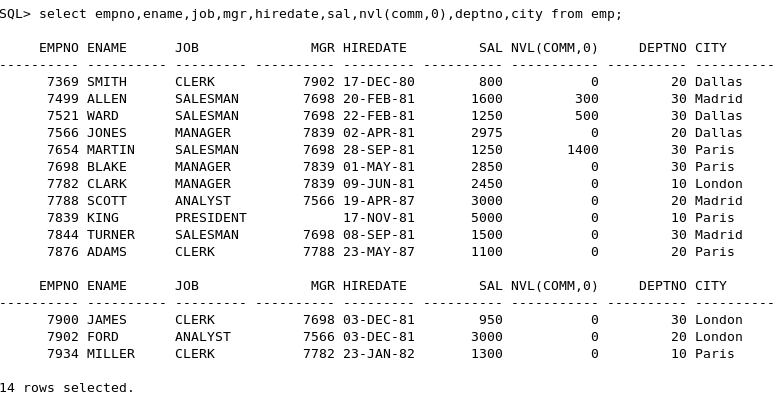
NVL Function a necessity
There are some situations where NVL function becomes essential, like for example, if we need to show the total salary by adding SAL+COMM columns then, if we give the following command we will get the Total salary as NULL for those employees whose COMM is NULL.

In these situations, the NVL function becomes very handy and we can use the NVL function to replace NULL / EMPTY / NA values with our own value. So to calculate total salary we can give the following command
select empno,ename,sal,comm,(sal+nvl(comm,0)) as Total from emp;

Also see NVL2() function in Oracle